My new website (the one which you are probably reading this very article on right now) is built with the Laravel framework. I am really happy with Laravel, however i didn’t find any option to dynamically optimize images on the fly. For a website like mine, which hosts hundreds of images, potentially all being served simultaneously (like in my gallery), that would of course be an advantage. So i decided to build my own solution. How it works and how i got to the solution, i will explain here.
Requirements
My goal was to implement an image Blade component that would render an optimized image. The image should be optimized regarding:
- Quality - Using a modern image format that has good image compression in order for images to load faster. I chose AVIF because most modern browsers support it. A comparison can be found here.
- Size - Smaller viewports should not load the full resolution image but one that better fits their screen resolution. A guide to responsive images can be found here.
- CLS - The Image component should automatically determine the width and height of the image and add them to the HTML image tag so that CLS gets prevented.
- Loading Animation - If the image has not loaded yet, a subtle pulse animation should play indicating the image is still loading.
The image component should be accessed like this:
<x-image src="storage/img/image.jpg" />The image component
Implementing the Blade component was relatively straight forward, the only things I want to mention that happen here is the calculation of the image dimensions, simply using PHP’s native getimagesize function and the generation of the srcset string. I created a config variable listing all sizes i want to support and then just loop over them and build the string like this. Also i don’t generate the srcset string if the Vite Server is running.
// app/View/Components/Image.php

public function __construct(
	public string $src,
	public string $loading = "lazy"
) {
	// If the vite development server is running, we can't do anything as
	// the Vite assets are not built.
	if (Vite::isRunningHot() && str_starts_with($src, file_get_contents(Vite::hotFile()))) {
		$this->width = null;
		$this->height = null;
		$this->srcset = null;
		return;
	}

	$path = parse_url($src, PHP_URL_PATH);

	[$this->width, $this->height] = getimagesize(public_path($path));

	if (!config("image-optimizing.enabled")) {
		$this->srcset = null;
		return;
	}

	$this->srcset = self::getSrcset($path);
}
Generating the resized srcset images
As i don’t want to create the images for each viewport size manually, i wanted to automate the process. I know the PHP gd library, but since it’s very slow, I thought about generating the images not first when they are requested, but already in the deployment process.
Failed attempt: Building images statically with Vite
Laravels native asset bundler is Vite. In addition to CSS and JavaScript files, Vite can also be used to build images. These can then be referenced with the Vite::asset facade provided by Laravel. My idea was to use a Vite Plugin which when building assets with npm run build, also generates the resized images.
This YouTube Tutorial was a starting point for me. At first sight, the Vite Image Optimizer Plugin does exactly what i need. The problem I had with this plugin tough was that it only generates one optimized image instead of several for every desired viewport size.
After a bit of unsuccessful tinkering, I stumbled over the Vite Plugin SrcSet. This indeed solved the problem I had regarding the multiple image outputs. The new problem I had with this was that I could not reference all the generated images in Blade because the generated Vite manifest did not have the correct output i needed. In short: The images were there, but i could not point to them.
An additional thing that annoyed me with this approach was that generating multiple output resolutions from images, and i have a lot of them, takes time. This is especially inconvenient when i make small changes to CSS or JavaScript files, since they are also built with Vite and to apply and deploy the changes, i need to restart the entire Vite build process again. I think i sometimes waited over 20 minutes for the assets to be rebuilt. That’s why i decided to no longer pursue this approach and instead go back to generate the different resolutions in PHP.
Solution: Generating images in PHP
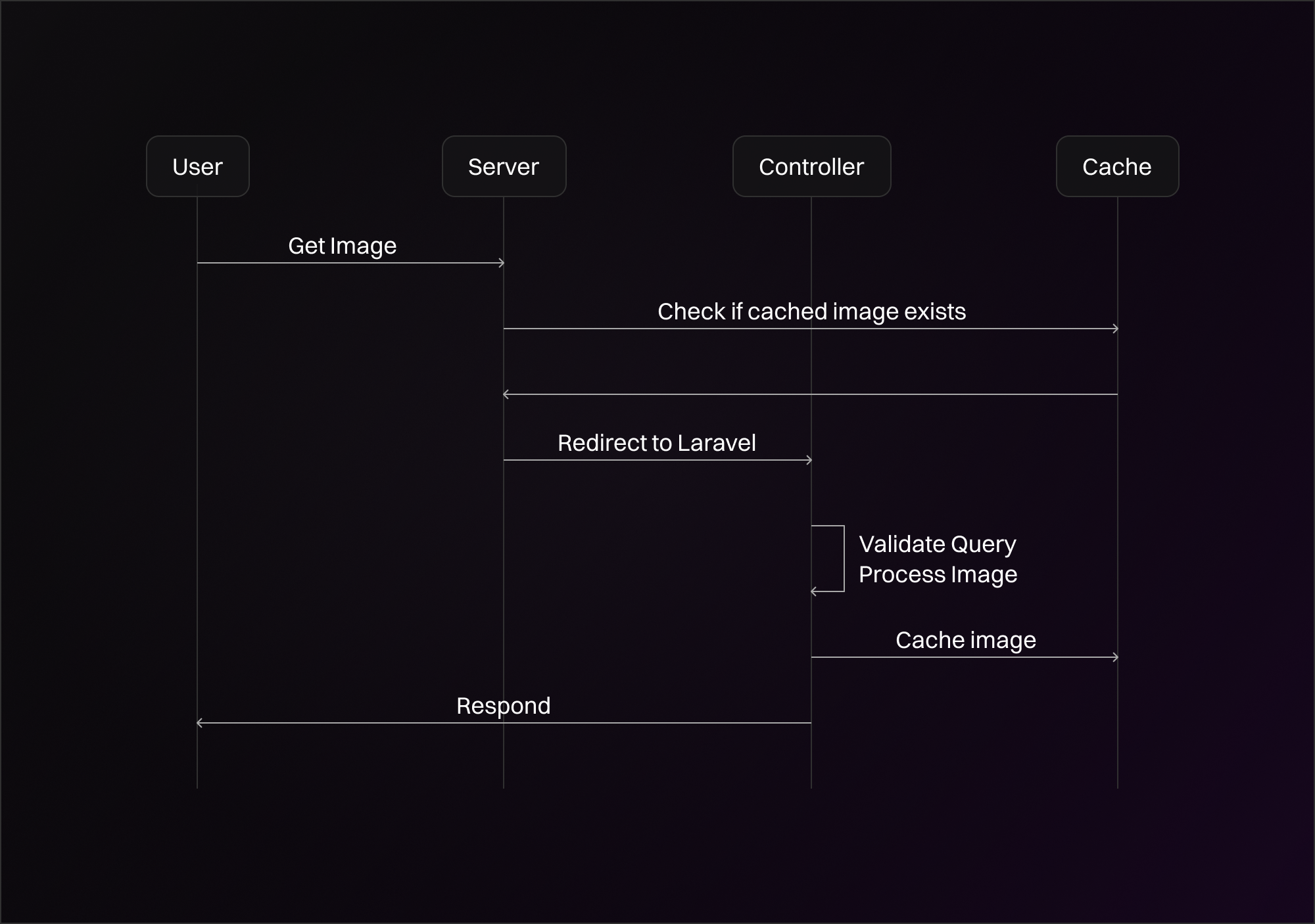
The basic idea that i had was just to cache already generated images. What i want to evaluate here is my IMHO clever approach to this. Here’s how it works:
The URLs to the images in the generated srcset point to two things, depending if the image has already been cached or not. Here is an example:
https://www.samuelkroiss.de/image-cache/image_jpg-1a2b9e0f-1500.avif?path=%2Fstorage%2Fimages%2Fimage.jpg&size=1500
If the image has not been cached yet, the Laravel application will start and route the request to the Controller. Here, the query parameters for path and size will be parsed and validated. Path is the relative path from the public directory to the image in question and size is the requested width. If the path is invalid (e.g. the image does not exist or the path contains ../), or the size is not supported, we will abort the request.
If everything is OK, PHP will load the image from the path, resize it to the requested width, convert it to AVIF and send it to the user. Additionally, PHP will store the image in the cache. The location of this is exactly the same location as the generated srcset URL. In this case we would store the image in public/image-cache/image_jpg-1a2b9e0f-1500.avif
In this example, image-cache ist just the name of the cache directory. image_jpg is the name of the image in question. I also append a hash of the path of the image, 1a2b9e0f, because the path hash should be different for every image. Else images with the same filename could not be stored in the same directory.
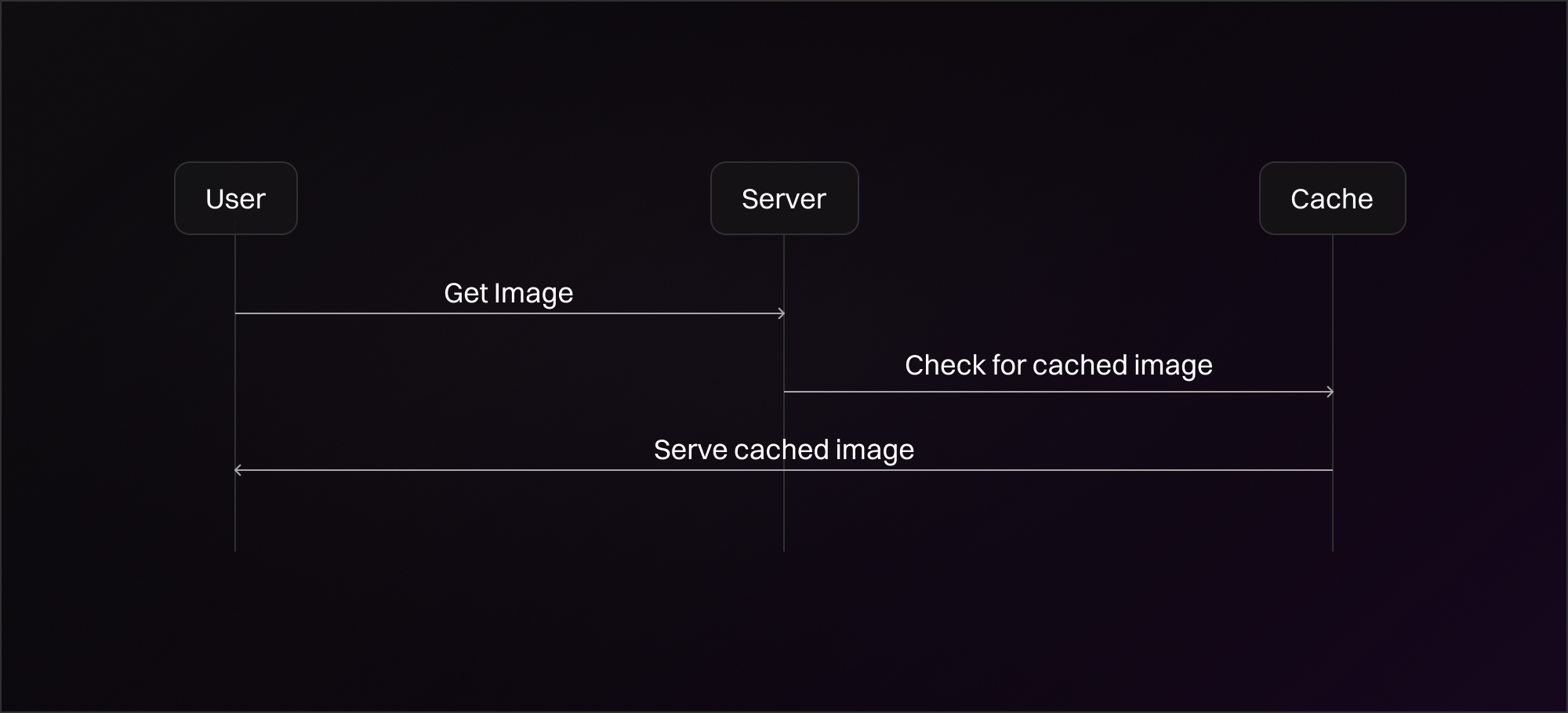
Now that the image is cached, successive requests to the URL will not regenerate the image. In fact, it will not even start the Laravel application, as the Webserver itself (in my case Apache) will have found that now at this URL, there exists a file and just respond with it directly instead of proxying the request to PHP.
Loading Animation
As a default, the image has lazy loading enabled. Lazy loading defers the loading of the image if it is not yet in the viewport, reducing total loading time.
Additionaly, as a placeholder for not yet loaded images i wanted a smooth animation. I used Tailwind CSS animate-pulse class in combination with a background color. Initially, i wanted loaded images to fade in smoothly, but this required wrapping them in a container div and transitioning the opacity. This was not elegant because this caused layout problems in some cases. So i settled for an easier approach. I used some JavaScript to add an attribute when the image loaded and disabled the animation in Tailwind CSS when it is present.
<img
loading="lazy"
onload="this.setAttribute('data-loaded', 'true')"
class="bg-active animate-pulse data-[loaded]:bg-transparent data-[loaded]:animate-none w-full h-full object-cover"
/>
Result
In conclusion, this approach allowed me to use the image component anywhere without worrying about the details for loading, optimizing and animating loading state. Using the image component like here:
<x-image src="storage/img/image.jpg" />would output this HTML code:
<img
src="https://www.samuelkroiss.de/storage/img/image.jpg"
width="5000" height="4000"
srcset="https://www.samuelkroiss.de/image-cache/image_jpg-1a2b9e0f-250.avif?path=%2Fstorage%2Fimg%2image.jpg&size=250 250w,
        https://www.samuelkroiss.de/image-cache/image_jpg-1a2b9e0f-500.avif?path=%2Fstorage%2Fimg%2image.jpg&size=500 500w,
        https://www.samuelkroiss.de/image-cache/image_jpg-1a2b9e0f-1000.avif?path=%2Fstorage%2Fimg%2image.jpg&size=1000 1000w,
        https://www.samuelkroiss.de/image-cache/image_jpg-1a2b9e0f-1500.avif?path=%2Fstorage%2Fimg%2image.jpg&size=1500 1500w"
loading="lazy"
onload="this.setAttribute('data-loaded', 'true')"
class="bg-active animate-pulse data-[loaded]:bg-transparent data-[loaded]:animate-none object-cover"
alt=""
/>